> For the complete documentation index, see [llms.txt](https://docs.3dolphins.ai/llms.txt). Markdown versions of documentation pages are available by appending `.md` to page URLs; this page is available as [Markdown](https://docs.3dolphins.ai/5.3.0-id/marketing/template/request-template/marketing-template/carousel-message.md).

# Carousel Message

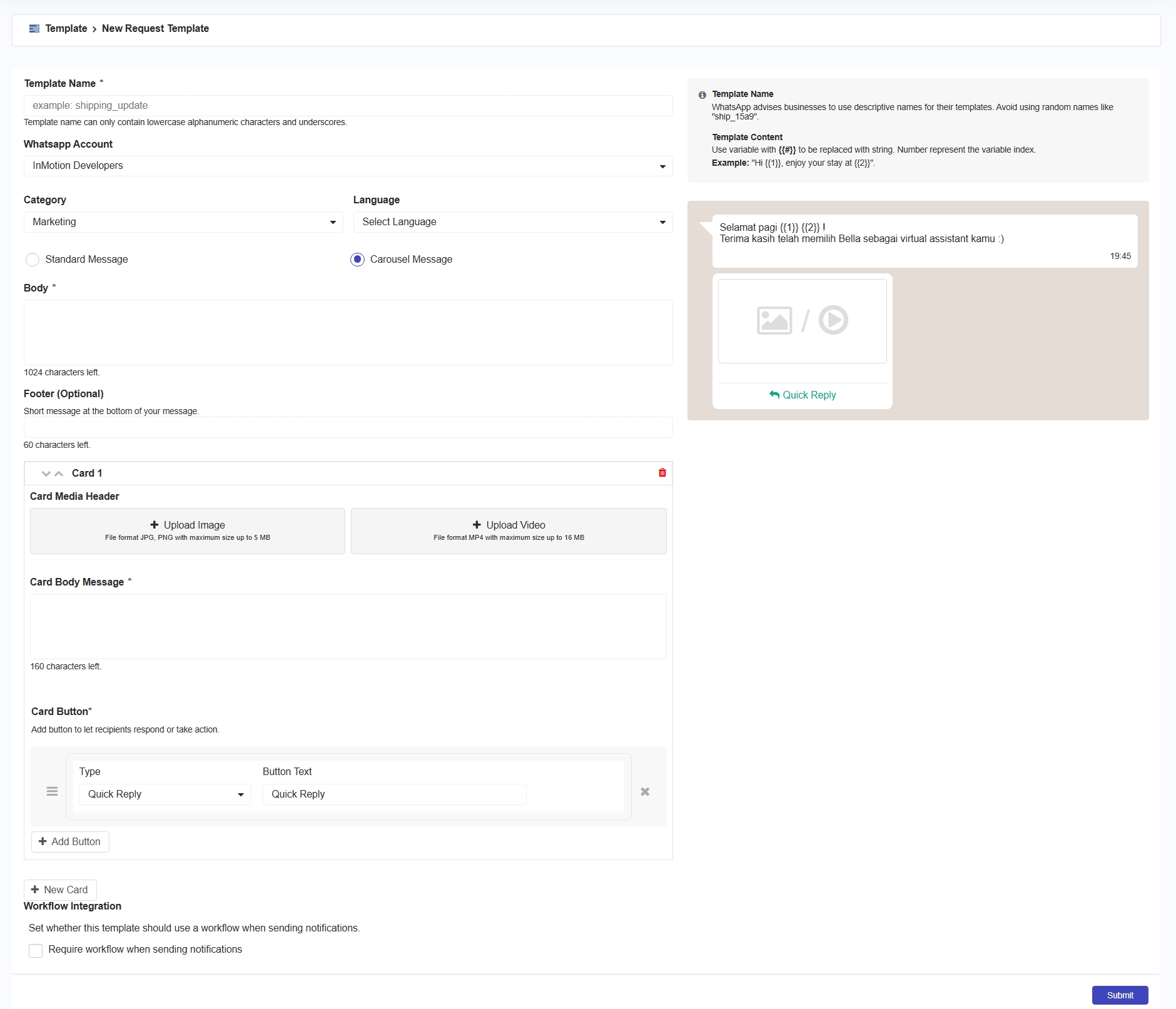
Carousel Message memungkinkan Anda untuk menampilkan beberapa informasi produk atau layanan dalam satu pesan menggunakan kartu (Card). Setiap card dalam Carousel Message dapat berisi gambar atau video sebagai tampilan utama, deskripsi singkat untuk menjelaskan produk atau layanan, serta tombol respons yang memudahkan pelanggan untuk mendapatkan informasi lebih lanjut.&#x20;

<figure><img src="/files/iLnMCkR7TiffCPcDEjpl" alt=""><figcaption><p>Carousel Template</p></figcaption></figure>

**Penjelasan Komponen :**&#x20;

| Komponen             | Deskripsi                                                                                                                                                                                                                                  |
| -------------------- | ------------------------------------------------------------------------------------------------------------------------------------------------------------------------------------------------------------------------------------------ |
| Card Media Header    | <p>Merupakan bagian atas dari Carousel. Anda dapat memilih menggunakan upload image atau upload video. <br><br><strong>Note:</strong> <br>1. Upload image -> format JPG atau PNG, max 5MB.<br>2. Upload video -> format MP4, max 16MB.</p> |
| Card Body Message    | <p>Untuk menambahkan deksripsi atau informasi tentang produk atau layanan yang ditawarkan<br></p><p><strong>Note:</strong> </p><p>maksimal 1024 karakter yang dapat ditulis.</p>                                                           |
| Card Button          | <p>Tombol interaktif di bawah deskripsi kartu. Pada Carousel, hanya terdapat tombol card dalam bentuk Quick Reply.</p><p></p><p><strong>Note:</strong> </p><p>maksimal tombol yang dapat digunakan yaitu 2 tombol.</p>                     |
| New Card             | <p>Untuk menambahkan card baru</p><p></p><p><strong>Note:</strong> </p><p>maskimal card yang dapat dibuat yaitu 10 card.</p>                                                                                                               |
| Workflow Integration | Menentukan apakah pengiriman pesan yang menggunakan template ini harus melalui proses workflow yang telah dikonfigurasi.                                                                                                                   |


---

# Agent Instructions
This documentation is published with GitBook. GitBook is the documentation platform designed so that both humans and AI agents can read, navigate, and reason over technical content effectively. Learn more at gitbook.com.

## Querying This Documentation
If you need additional information that is not directly available in this page, you can query the documentation dynamically by asking a question.

Perform an HTTP GET request on the current page URL with the `ask` query parameter, and the optional `goal` query parameter:

```
GET https://docs.3dolphins.ai/5.3.0-id/marketing/template/request-template/marketing-template/carousel-message.md?ask=<question>&goal=<endgoal>
```

`ask` is the immediate question: it should be specific, self-contained, and written in natural language.
`goal` is optional and describes the broader end goal you are ultimately trying to accomplish on behalf of the user. GitBook uses it to tailor the answer towards what is most useful for that goal.

The response will contain a direct answer to the question and relevant excerpts and sources from the documentation.

Use this mechanism when the answer is not explicitly present in the current page, you need clarification or additional context, or you want to retrieve related documentation sections.
