> For the complete documentation index, see [llms.txt](https://docs.3dolphins.ai/llms.txt). Markdown versions of documentation pages are available by appending `.md` to page URLs; this page is available as [Markdown](https://docs.3dolphins.ai/5.3.0-id/marketing/template/request-template/utility-template/workflow-integration.md).
# Workflow Integration
**Workflow Integration** digunakan untuk menentukan apakah pengiriman pesan yang menggunakan template ini harus melalui proses workflow terlebih dahulu. Ketika Anda memilih atau menceklis checkbox '**Require workflow when sending notifications'** menandakan **bahwa** setiap pesan pengiriman yang menggunakan template ini wajib diproses menggunakan workflow yang telah dikonfigurasi.
{% hint style="info" %}
Untuk mengetahui lebih lanjut mengenai workflow, Anda dapat mengunjungi halaman [ini](/5.3.0-id/bot-settings-1/process-flow.md).
{% endhint %}
Workflow Integration
{% hint style="info" %}
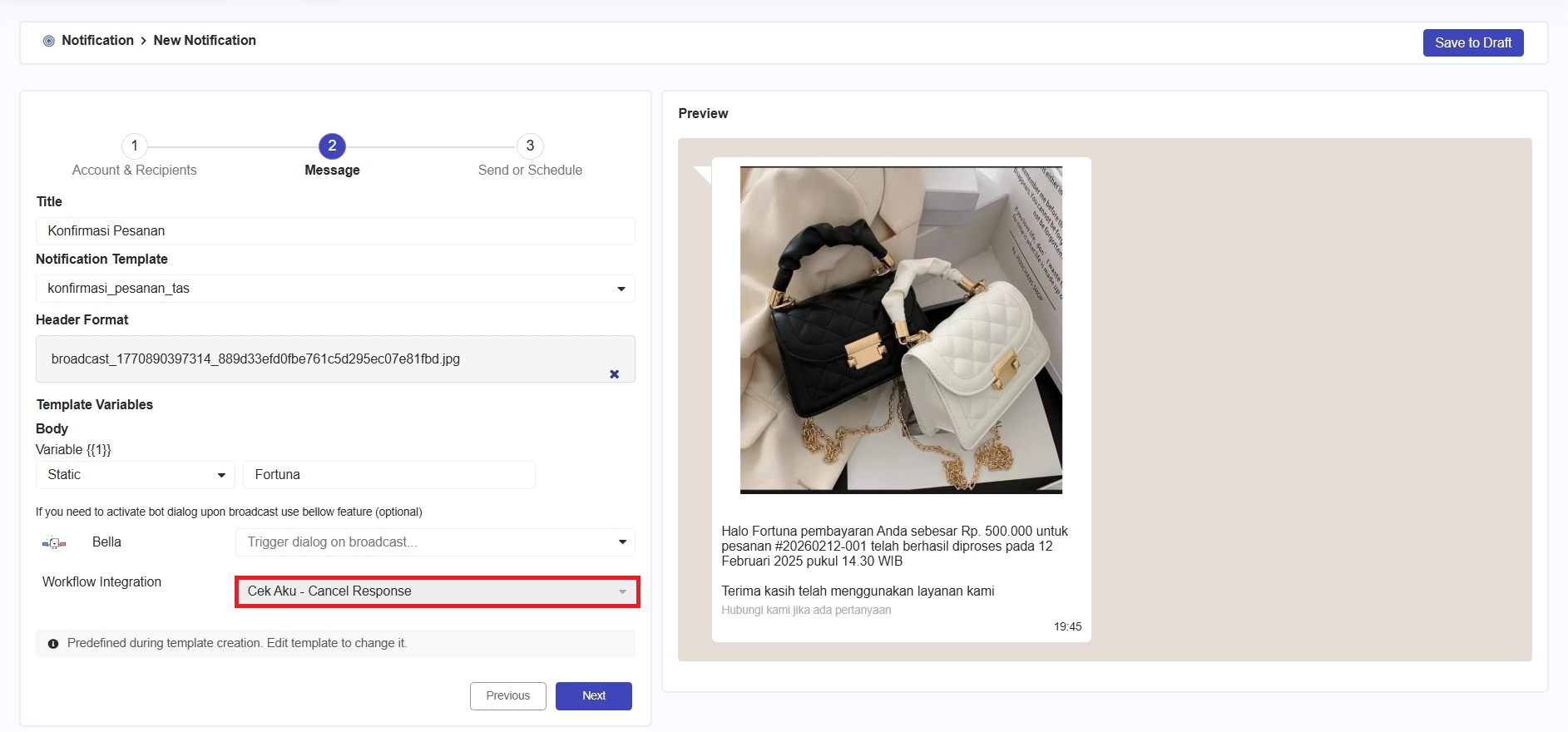
Ketika Anda memilih workflow integration, field workflow di halaman notification akan terisi secara otomatis sesuai dengan konfigurasi workflow pada template dan tidak dapat diubah.
{% endhint %}
Sebagai contoh pada gambar di atas, setelah mencentang checkbox dan memilih workflow, ketika Anda membuat pesan broadcast di halaman [notification](/5.3.0-id/marketing/notification.md) (masuk ke menu [**Notification > Create Notification**](/5.3.0-id/marketing/notification/create-notification.md)) bagian **Message** menggunakan template tersebut, field workflow akan terisi secara otomatis sesuai konfigurasi pada template dan tidak dapat diubah, seperti yang ditunjukkan pada gambar di bawah ini.