> For the complete documentation index, see [llms.txt](https://docs.3dolphins.ai/llms.txt). Markdown versions of documentation pages are available by appending `.md` to page URLs; this page is available as [Markdown](https://docs.3dolphins.ai/customer-service/ticket-automation/auto-greeting-with-time-based-response.md).
# Auto Greeting with Time Based Response
This feature allows the system to automatically send messages to customers based on the time range specified through the filter settings on the Ticket Automation page.
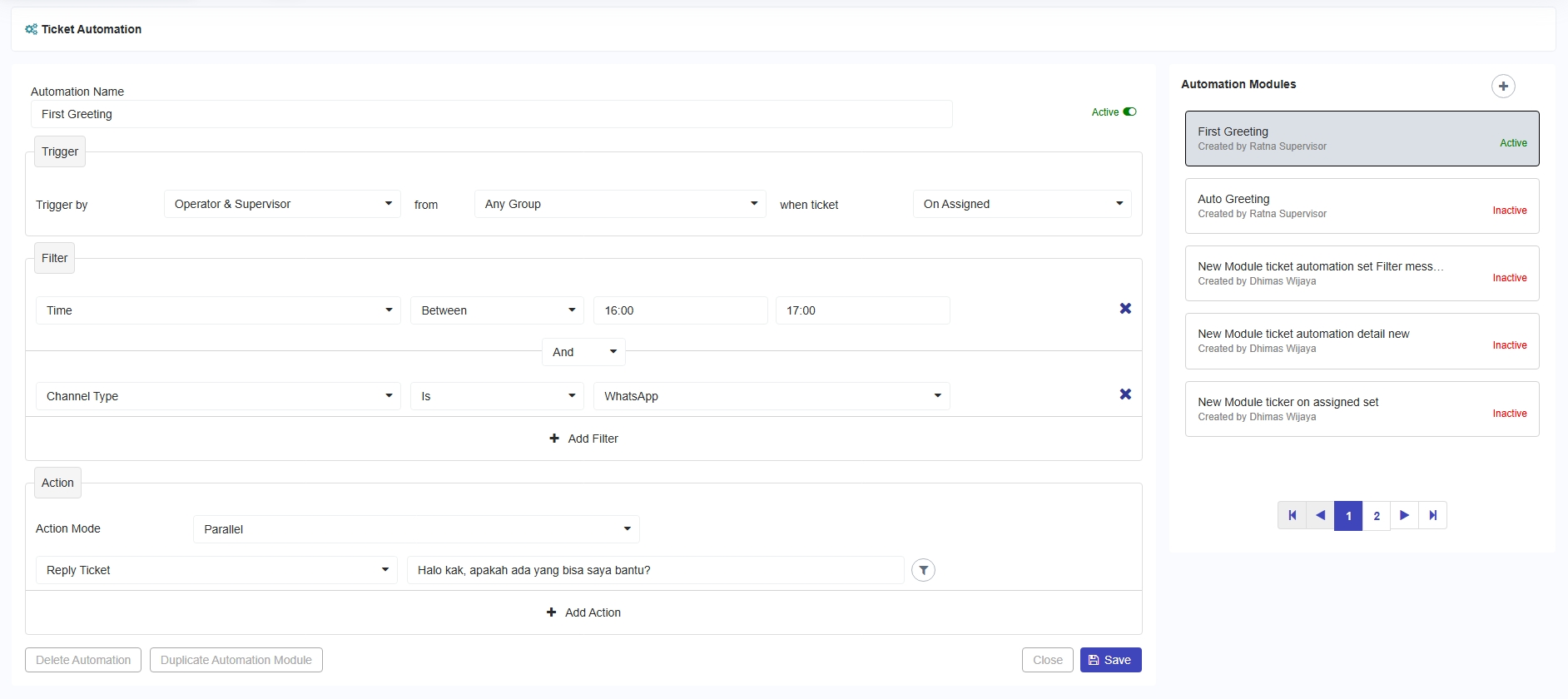
For example, when a customer ticket has been assigned by an Operator or Supervisor from any group between 4:00 PM and 5:00 PM, the system will automatically reply to the ticket via WhatsApp with a predefined message, as shown in the following image.
Configure First Greeting
When a ticket has been successfully assigned, the system will automatically send a message as shown in the following image.
Agent Dashboard
The WhatsApp conversation view on the customer page can be seen in the following image.